
Stop keying documents into Acumatica
DynamoDocs captures your invoices, purchase orders, and RFQs from email or upload, reads them with AI, validates every field, and posts them into Acumatica. Your team reviews the exceptions instead of retyping every document.
30-minute session · run against your own Acumatica document types · no commitment
- 5–10 minutes of manual entry per document into Acumatica, gone
- 100% validated before anything posts to Acumatica
- PDF · Excel · EDI · image · email
DynamoDocs automates document data entry into Acumatica. Invoices, purchase orders, and requests-for-quote arrive by email or upload in any common format. AI reads and classifies each one, the data is checked automatically, and approved records are posted into Acumatica through the Acumatica contract-based REST API. Acumatica is a fast-growing cloud ERP for distribution, manufacturing, and services businesses, sold in Australia and New Zealand as MYOB Acumatica.
The mapping
How your documents land in Acumatica
A point-and-click field mapper shapes each record into what Acumatica expects, so there's no JSON to hand-edit.
Invoice →
Becomes an AP bill in Acumatica, with header and line items mapped and validated before posting.
Purchase order →
Becomes a sales order, with required fields enforced so nothing posts half-filled.
RFQ →
Becomes a sales quote, ready for your team to act on without retyping.
Connection
DynamoDocs connects via the Acumatica contract-based REST API, running in simulation mode until you switch it live, with credentials encrypted at rest.
Specific to Acumatica
How DynamoDocs fits Acumatica
Contract REST API
Connects through the Default contract-based endpoint, with the endpoint version set per instance.
Native records
Posts AP Bills, sales orders (order type SO), and sales quotes (order type QT).
Company and branch
Signs in to the company and branch you name, and maps vendors, customers, GL accounts, and inventory IDs to yours.
Acumatica AP automation: supplier invoices to Bills
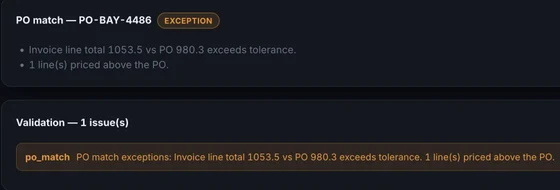
Supplier invoices arrive in a shared mailbox (Microsoft 365, Gmail, or any IMAP inbox) or by upload. DynamoDocs reads each one with AI, header and every line, and checks it before anything reaches Acumatica: required fields present, totals that add up, a vendor it can resolve, and no second copy of an invoice already processed.
An invoice that passes is posted as an Acumatica Bill: vendor, reference number, date, due date, currency, and description on the header; GL account, inventory ID, quantity, unit cost, amount, and line description on each line. One that fails lands in a review queue with the problem named on the field, beside the original PDF, so a reviewer corrects one value and posts it.
Approval routing is there when you want it, by amount band, vendor, GL account, or document type, with out-of-office delegation and approve or reject links that work without a login. Two- and three-way matching are available too, with receipts taken from the packing slips you already receive (advance ship notices count as receipts only if you turn that on). Approved bills can be exported as a payment proposal CSV or a NACHA file; DynamoDocs never moves money.
Supplier credit memos are recognized as their own document type, linked to the invoice they offset, and flagged when they cite nothing or credit more than the original. They are not yet posted to Acumatica automatically: rather than risk booking a credit as a payable, they wait for your team.
Order-to-cash and sales order automation
Customer purchase orders are the other half of the inbox. DynamoDocs captures them from email, upload, or EDI, extracts the header and every line, and posts a sales order (order type SO) to Acumatica with the customer, their PO number in the customer order field, the order date, the requested date, and each line’s inventory ID, quantity, and unit price. Requests for quote become sales quotes (order type QT).
Lines missing an inventory ID, or quantities and prices that break a rule you set, are held for order entry to confirm instead of posting half right. For EDI partners, DynamoDocs answers each order automatically once it passes validation: an 855 acknowledgment for a new order or an 865 for a change. The 856 ship notice and 810 invoice the partner expects later in the cycle go out from the same order.
Where it stops: DynamoDocs does not create the AR invoice inside Acumatica or apply the customer’s payment. It gets the order in correctly and keeps the trading partner answered; billing and cash application stay in Acumatica.
Document processing and data extraction
Five document types go through the same pipeline: supplier invoices, credit memos, customer purchase orders, requests for quote, and vendor statements. Statements are reconciled line by line against the invoices and credits already processed, to the cent, and never post anything.
Extraction does not depend on a template per vendor. The AI reads layouts it has never seen, and each field it is unsure of is flagged for review rather than guessed. Document types, fields, and validation rules are settings, so adding a field to what you capture does not need a developer.
EDI for Acumatica
DynamoDocs reads X12 850 purchase orders, 860 order changes, 810 invoices, and 856 ship notices, and sends 997 functional acknowledgments, 855 order acknowledgments, 865 change acknowledgments, 856 ship notices, and 810 invoices. It also reads the 999s partners send back and reconciles them against what was sent.
Each trading partner is a configuration record: its ISA qualifier and ID, how documents travel (AS2, SFTP, or a folder that an SPS Commerce, Cleo, or TrueCommerce client already watches), which responses go out automatically, and the specifics of that partner’s implementation guide. Both transports are tested against independent implementations: AS2 against Mendelson’s public test server and SFTP against OpenSSH. No trading partner certifies a vendor in advance; each runs its own test cycle with you, and we support that cycle.
How it connects to Acumatica
DynamoDocs uses Acumatica’s contract-based REST API on the Default endpoint, with the endpoint version set per instance. It signs in as a service user for the company and branch you specify, writes the record (Bill or SalesOrder), and signs out. Vendors, customers, GL accounts, and inventory IDs are mapped to your own in a point-and-click field mapper.
A new connection runs in simulation mode until you switch it live, so you can inspect every mapped record before the first real post. If you would rather import than post, the same mapped records can be written as CSV files for an Acumatica import scenario.
MYOB Acumatica (Australia and New Zealand)
MYOB sells Acumatica in Australia and New Zealand as MYOB Acumatica. It is the same platform with the same contract-based REST API, so everything on this page applies unchanged: the same connector, the same Bills and sales orders, the same EDI. Invoices in AUD or NZD carry their currency through to the Bill.
Enterprise deployments can be self-hosted or run in a dedicated cloud region; the security page covers data handling in detail.
For measured production numbers, the distributor case study covers four months of live AP, run on Epicor Prophet 21 rather than Acumatica.
The business case
What manual entry is costing you
Drag the sliders to model your own volume. Defaults are deliberately conservative.
Hours given back / month
—
—
Estimated labor saved / year
—
Before error-correction and faster close.
Manual touches eliminated / month
—
—
Monthly keying labor, before vs after
Want this modeled on your real numbers? See it on your documents
Plans start at $1,500/mo, a fraction of the labor above. See pricing
Built for Acumatica teams
What people search for
DynamoDocs does each of these for Acumatica.
Config over code
Add a document type or field in Settings; the AI prompt and review screen update automatically. No redeploy.
Review only exceptions
Clean documents post to Acumatica automatically; flagged ones land in a queue, each problem tied to the exact field.
Train on your documents
Upload a few real samples and the extractor learns your vendors' layouts before anything goes live.
Secure & isolated
One private instance per customer; credentials encrypted with AES-256-GCM and never shown to the browser.
Questions, answered
Acumatica automation FAQ
Does DynamoDocs automate order-to-cash in Acumatica?
It automates the document side of it. Customer purchase orders arriving as PDFs, emails, or EDI 850s become Acumatica sales orders, and EDI partners are answered with an 855 acknowledgment, then the 856 ship notice and 810 invoice. Creating the AR invoice inside Acumatica and applying the customer’s payment stay in Acumatica.
Can DynamoDocs do Acumatica AP automation?
Yes. Supplier invoices are captured from your AP mailbox or an upload, read by AI, validated, and posted as Acumatica Bills with vendor, dates, currency, GL accounts, inventory IDs, quantities, and unit costs mapped. Only invoices that fail a rule wait for a person.
Is there EDI for Acumatica?
Yes. DynamoDocs reads X12 850, 860, 810, and 856 documents and sends 997, 855, 865, 856, and 810 back, over AS2, SFTP, or a folder your VAN client already watches. Orders from EDI partners land in the same queue as emailed PDFs and post to Acumatica the same way.
Does it work with MYOB Acumatica?
Yes. MYOB Acumatica runs on the same platform and exposes the same contract-based REST API, so it uses the same connector with no separate setup.
How does DynamoDocs connect to Acumatica?
Through Acumatica’s contract-based REST API, signing in as a service user for the company and branch you name. A new connection runs in simulation mode until you switch it live, so you can check each mapped record before anything posts. Credentials are encrypted with AES-256-GCM.
Does Acumatica document recognition require templates?
No. The extraction reads layouts it has not seen before, so a new vendor’s invoice does not need a template. If a vendor’s layout keeps producing the same correction, a few sample documents teach the extractor that layout.
See it run against your Acumatica
Bring a real invoice, PO, or RFQ and watch it go from inbox to posted in Acumatica in about 30 minutes. We'll work out what it saves you.
Acumatica automation by industry
Run a different ERP?