Hours back, every day
Seconds per document, start to posted. Your AP and order-entry staff spend their time on the handful of real exceptions, the work that actually needs judgment.
 DynamoDocs
DynamoDocs captures your invoices, purchase orders, and RFQs from email, upload, or EDI, reads them with AI, validates every field, and posts them into your ERP. Your team reviews the exceptions instead of retyping every document.
A 30-minute session, run on your own document types. No commitment.
From the live demo: most documents post on their own, and the ones that stop arrive with the reason already attached. Try it yourself
The short version
DynamoDocs turns your invoices, purchase orders, and requests-for-quote into clean ERP records with almost no human typing.
Work that used to take 5–10 minutes per document is now done in seconds.
Documents arrive from a monitored mailbox (Microsoft 365, Gmail, or IMAP), by drag-and-drop, or over EDI (SFTP, AS2, or a folder your VAN client already watches). PDFs, Excel, HTML, images, forwarded emails, and EDI X12 are all accepted.
The AI classifies the document and extracts every field into a structured record, guided by your schema and plain-English processing rules. You can train it on your own sample documents.
Each record is checked against your rules. Clean documents pass automatically, and the ones that fail land in a review queue, flagged field by field for a quick human fix.
A visual field-mapping engine shapes each record into what your ERP expects and posts it: an invoice becomes an AP bill, a PO a sales order, an RFQ a quote. EDI partners get back the documents they require, sent automatically: order acknowledgments, ship notices, and invoices.
Drag the sliders. The math is conservative. Most teams handle more documents, and more error rework, than the defaults assume.
Hours given back / month
—
—
Estimated labor saved / year
—
Before counting error-correction and faster month-end close.
Manual touches eliminated / month
—
—
Monthly keying labor, before vs after
Want this modeled on your real numbers? See it on your documents
Plans start at $1,500/mo, a fraction of the labor above. See pricing
We went from six minutes an invoice to eighteen seconds, and that's only on the invoices that need review. Everything else posts without anyone touching it.
Her team runs about 1,900 invoices a month from 459 vendors, matched against Epicor Prophet 21. Across the first four months, 97% needed no manual correction, and that includes most of what stopped for review. Being flagged is not the same as being wrong: those are usually waiting for a sign-off, a vendor note on the PO or a receipt not yet posted in the ERP, and nothing on the document gets changed. The full breakdown of what the review queue contains is in the case study.
Seconds per document, start to posted. Your AP and order-entry staff spend their time on the handful of real exceptions, the work that actually needs judgment.
Replace $2–$6 of keying labor per document with automated extraction. Handle more documents without adding headcount to match.
Validation catches problems before they hit the ERP. No more duplicate payments, wrong totals, or mismatched line items quietly flowing downstream.
Invoices post the day they arrive, and quotes and orders turn around faster. That means less backlog and a quicker month-end.
Everything below is configuration. A new document type or ERP field is a settings change, not a project. Prefer seeing to reading? Take the product tour and watch every capability run in the live demo.
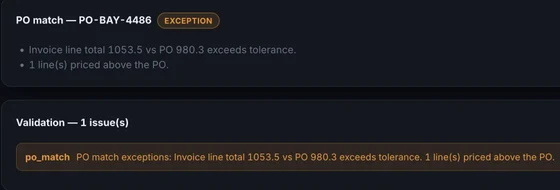
Clean documents post to your ERP on their own. The ones that fail a rule land in a review queue with the discrepancy already named, next to the original document. A reviewer fixes the one bad field and posts it; nobody retypes anything.
Partners who mandate EDI and customers who email a PDF land in the same place, with the same validation, matching, and ERP posting. DynamoDocs reads X12 850 orders and 860 changes, and sends back the 997, 855, 865, 856, and 810 documents partners require, automatically and only for documents that pass validation. Each partner's implementation guide is configuration.
ST*850*0001  received over AS2
BEG*00*NE*PO-BAY-4486  new order
N1*ST*BAYSIDE MFG*92*BAY  ship-to matched
PO1*1*144*EA*4.12*PE  line validated
→ 997 sent  functional acknowledgment
→ 855 sent  order accepted
→ SO-10442 created  NetSuite
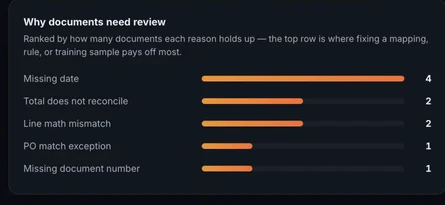
A dashboard tracks documents processed, time saved, and exceptions caught. It names the documents that have stalled and ranks the reasons documents need review, so you can see what keeps sending work to a person and fix it. Search spans every document with date, amount, and vendor filters, and export history lets you retry any failed post.
Test any email or ERP connection from the settings screen, and keep every ERP target in simulation mode until you switch it live, so you can confirm the exact payload before anything reaches your books.
Once a document has posted to an ERP, it won't post there again unless someone deliberately confirms it. A double-clicked button or a retried job can't quietly create a second bill in your ledger.
A resent invoice and one reissued with different figures are different problems, and are flagged as such. Every invoice is matched against the purchase order it references and, if you want the third leg, against what actually arrived at the dock, so you don't pay for goods that never came.
Credit notes are linked to the invoice they offset and posted as vendor credits, never quietly booked as payables. Vendor statements are reconciled line by line against what you actually captured, surfacing missed invoices and amounts that disagree.
Every document keeps an append-only history: how it arrived, each status change, each export, and each edit with the person who made it. Edits show the before and after value of every field, so “who changed this amount?” has an answer.
Routing rules pick the approver by amount, vendor, GL account, or document type. Delegation covers vacations, reminders chase stragglers, and a signed link in the notification approves without a login. Off by default.
Send a supplier a signed link and they confirm your order, propose a different date or quantity, or decline. One page, no login, nothing to sign up for. An answer that changes the order is flagged and routed to review, because an order reading “arriving Tuesday” when the supplier has said Friday is exactly the surprise worth catching early.
Add a document type or extracted field in Settings and both the AI prompt and the review screen update automatically. No redeploy.
Capture invoices from email or upload, read them with AI (beyond OCR), and post them to your ERP as bills.
Touchless AP: capture, validate, and post supplier invoices automatically, and review only the exceptions.
Turn incoming POs and RFQs into sales orders and quotes in your ERP, with no order-entry typing.
Trading partners who mandate EDI, in the same queue as everyone who emails a PDF, with acknowledgments sent back automatically.
It captures invoices, credit memos, purchase orders, RFQs, vendor statements, and goods receipts (packing slips and ship notices) from email, upload, or EDI, extracts and classifies them with AI (EDI parses exactly, with no AI step), validates the data, routes only exceptions to a human, and posts finished records directly into your ERP. EDI partners also get the acknowledgments they require sent back automatically. The same captured paperwork drives supplier order confirmations, a live inbound-shipment board, and supplier scorecards.
No. Traditional OCR turns an image into raw text and usually needs a template built for each vendor layout. DynamoDocs uses AI to understand the document, identifying which value is the total and which rows are line items, across layouts it has never seen. OCR is just one step. DynamoDocs handles the whole path from inbox to a validated, posted ERP record.
Keying one document into an ERP typically takes 5–10 minutes and costs $2–$6 in labor, plus the cost of fixing data-entry mistakes. DynamoDocs processes documents in seconds and only asks a person to review the small fraction that fail validation, which commonly cuts document-handling labor by 80–95%. Use the calculator above to run your own numbers, or see what it measured at a live customer.
ERP targets include Infor XA, SAP, Dynamics 365, Business Central, QuickBooks Online, NetSuite, Sage Intacct, Sage 50, Xero, Acumatica, and Epicor Prophet 21, plus any system via a generic REST or CSV connector. Documents come in via Microsoft 365, Google Workspace/Gmail, any IMAP mailbox, drag-and-drop, or EDI, over SFTP, AS2, or a folder your VAN client (SPS Commerce, Cleo, TrueCommerce) already watches.
Every document is validated automatically. Clean ones pass through on their own. Anything that fails a rule is flagged field by field and sent to a review queue, so people only handle exceptions. You can also train the extractor on your own sample documents to improve accuracy on your vendors' formats.
No. Document types, fields, validation, processing rules, and ERP field mappings are all configuration edited in the Settings UI. Adding a new document type or field takes a few minutes in Settings.
Receiving is built in today: UBL/Peppol BIS invoices, credit notes, and orders, Factur-X/ZUGFeRD, and cXML parse exactly, with no AI step. That covers the receive-side obligation countries like Germany already impose. Sending e-invoices over the Peppol network is available on request through certified access-point partners. If you issue into a mandate country (France's September 2026 rules run through certified PDP platforms), raise it during scoping and we'll wire delivery for your instance and market.
Each customer runs an isolated instance with its own database, secrets, and credentials. Nothing is shared between customers. Connector credentials are encrypted at rest with AES-256-GCM, sessions use httpOnly cookies, and access is role-gated. It can be self-hosted or run as a managed deployment.
Explore the live demo, or book a 30-minute live demo session to see DynamoDocs run against your own document types.
I built DynamoDocs after watching AP and order-entry teams retype documents a machine should have read. If you book a demo, you'll be talking to me. Bring your ugliest invoice.
Scott · Uptimize Solutions
Bring two or three of your real documents: your ugliest invoice, a customer PO, an EDI file. In 30 minutes we'll run them through extraction, validation, and a mapping to your ERP, live. You'll leave knowing exactly what your rollout would look like.